
How to Tell If Someone Blocked You on iMessage — 7 Signs to Check
- 22 hrs ago|
- By Yjagadeesh
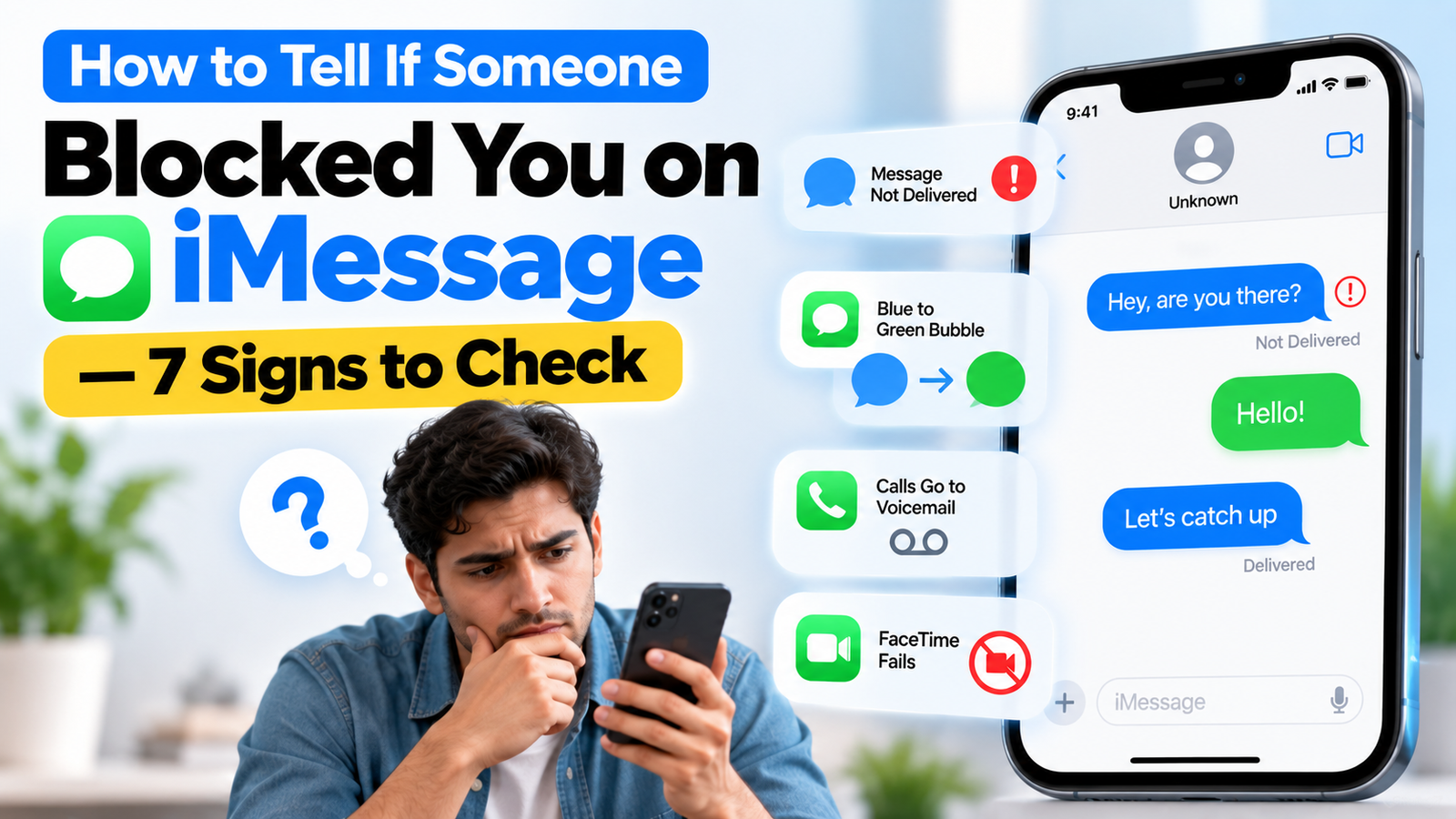
together, missing delivery status, a bubble that switched from blue to green, calls that ring once before voicemail, and FaceTime that fails instantly. No single sign proves it on its own.
This guide covers exactly what you need:
- The real delivery and bubble-color signs — and the iOS version detail most guides miss
- Call and FaceTime tests you can run without sending a single text
- Lesser-known signs — predictive text, Focus indicators, and group chat behavior
- False positives that look like a block but are not
- A step-by-step test sequence to confirm what is actually happening
Why Apple Never Tells You Directly
Apple does not send any notification, alert, or confirmation when someone blocks your number on iMessage. This is a deliberate design choice; the entire system is built so the blocked person has no definitive way to know for certain, which is exactly why this has become one of the most searched iPhone questions. Everything that follows is indirect evidence, not confirmation.
Sign 1 — Your Message Never Shows Delivered
Under a sent iMessage, you normally see Delivered appear within seconds, and Read if the recipient has read receipts on. If a message sits with no status at all beneath it indefinitely, that is the single strongest signal something is blocking it.
There is an important wrinkle here: on iOS 16.5 and later, Apple changed how this works, and you may still see a Delivered notification even if you have actually been blocked. This means the absence of Delivered remains a reliable signal, but its presence no longer guarantees you are not blocked the way it once did on older iOS versions.
Sign 2 — The Bubble Switches From Blue to Green
Blue bubbles indicate iMessage, while green bubbles indicate SMS, MMS, or RCS messages on current versions of iOS, as explained in Apple's guide to iMessage, RCS, and SMS/MMS
This sign alone is not conclusive. The same green switch happens if the other person turned off iMessage, switched to an Android phone, or is sitting somewhere with no data connection. Treat this as one data point, not proof.
Sign 3 — Calls Ring Once, Then Go to Voicemail
Blocked callers are typically routed to voicemail without ever actually ringing on the recipient's end but you, the caller, usually hear one or two rings before it cuts to voicemail. This happens because iOS intercepts the call before it reaches their device, while still playing a brief ring on your side to simulate normal call behavior.
For additional context on how blocking affects calls, messages, and FaceTime, see this iPhone and iMessage blocking guide.
A call that goes straight to voicemail with zero rings, or rings normally several times before voicemail, is far less suspicious and usually just means they are busy or declined the call.
Sign 4 — FaceTime Fails Instantly or Cuts Off After Half a Ring
This is one of the more reliable tests precisely because it does not require sending a text. Place a FaceTime call. If it connects and rings normally, you are almost certainly not blocked. If it ends abruptly after half a ring or fails to connect at all, that is a strong indicator.
Sign 5 — Predictive Text Stops Suggesting Their Name
A sign most guides overlook: when you frequently message someone, iMessage's predictive text normally suggests their name as you start typing a new message. If a contact you message regularly suddenly stops appearing in those suggestions, it can be because iMessage deprioritizes blocked contacts in its prediction system. This is subtle, but worth checking if the more obvious signs are ambiguous.
Sign 6 — The Focus Mode Moon Icon Disappears
On iOS 15 and later, if the person you are messaging has a Focus mode active, you normally see a small moon icon in the conversation along with a note that notifications are silenced for them. If this indicator was previously visible for that contact and has now permanently vanished alongside the other signs, it can suggest the connection between your devices has been cut off entirely rather than the person simply changing their settings.
Sign 7 — Location Sharing Stops Automatically
If you previously shared location with this person through Find My, a block typically causes that sharing to stop working, their location simply disappears from your view with no notification explaining why. Combined with the other signs on this list, a sudden and unexplained loss of shared location is a meaningful signal.
What Still Works Even If You Are Blocked
One detail that confuses people: even if someone has blocked you individually, you can often still send and receive messages within a group chat that includes them both. Blocking appears to apply primarily to direct, one-on-one communication rather than filtering every group thread you share, which is why a working group conversation does not rule out being blocked in direct messages.
Apple explains how blocking works across Messages and other communication apps in its guidance on blocking messages and senders.
Signs That Look Like Blocking But Are Not
Several completely innocent situations produce identical symptoms to being blocked:
- Airplane mode or no signal — their phone cannot receive anything until it reconnects, and your message will sit exactly like a blocked one in the meantime
- iMessage turned off on their end — forces every conversation to green SMS regardless of any block
-
Understanding how different messaging platforms handle communication can help you compare messaging apps and their features before switching between services.
- A new phone or SIM — can temporarily break iMessage delivery to a contact who has not re-registered their new number yet
- An Apple service outage — rare, but genuinely causes Delivered and Read statuses to stop appearing across the board temporarily
- A single Not Delivered error — this specifically means something else entirely; it is not, on its own, a sign of a block
A Step-by-Step Test You Can Run Right Now
To move from suspicion to a reasonably confident conclusion, run these in order:
- Send one normal message and watch for 10-15 minutes — does Delivered ever appear, and does the bubble stay blue or switch to green?
- Call once — count whether it rings zero times, once, or multiple times before voicemail
- FaceTime once — note whether it connects normally or cuts off almost immediately
- Check another platform — if you are also connected on WhatsApp, Instagram, or similar apps, see whether those show similar disruption
If you're comparing different messaging platforms, you can also explore these popular online chatting apps and their communication features.
If three or more of these point the same direction, you are looking at a genuine pattern rather than a coincidence. If they are mixed, some normal, some not, an innocent explanation like a dead phone or switched carrier is more likely.
Conclusion
How to tell if someone blocked you on iMessage ultimately comes down to reading a pattern, not finding a single smoking gun because Apple deliberately never confirms it either way.
Quick recap:
- Missing Delivered status is the strongest individual signal, though less certain on iOS 16.5 and later
- Blue-to-green switching, one-ring calls, and instant FaceTime failure each add weight to the pattern
- Predictive text and Focus indicators are lesser-known but genuinely useful secondary signals
- Group chats can still work even when you are blocked individually
- Run the full test sequence before concluding anything — one sign alone proves nothing
If every test lines up the same way, trust the pattern. If the signals are mixed, give it a day most of the innocent explanations resolve themselves quickly.
Frequently Asked Questions (FAQs)
Q1. Does iMessage tell you when someone blocks you?
No. Apple never sends a notification, alert, or confirmation of any kind when someone blocks your number. This is intentional on Apple's part, which is exactly why users have to rely on indirect signs like missing delivery status, bubble color, and call behavior rather than a direct answer from the app itself.
Q2. If my iMessage still shows Delivered, am I blocked?
Not necessarily, but it depends on your iOS version. On iOS 16.4 and earlier, a Delivered status reliably meant you were not blocked. On iOS 16.5 and later, Apple changed this behavior, and a Delivered notification can still appear even when you have actually been blocked, making this sign less conclusive than it used to be on newer software.
Q3. Why did my texts turn from blue to green?
A switch from blue to green means your message is now being sent as standard SMS instead of iMessage. While this can happen because of a block, it is far more commonly caused by the other person turning off iMessage, switching to an Android device, or having no internet connection at that moment, so treat it as one clue among several, not proof on its own.
Q4. Can I still message someone in a group chat if they blocked me?
Often, yes. Blocking on iMessage appears to primarily affect direct, one-on-one conversations rather than every shared group thread. This means a group chat that still functions normally does not rule out the possibility that you have been blocked in direct messages with that same person.
Q5. What is the most reliable way to check if I am blocked?
No single sign is fully reliable on its own. The strongest approach is running a short sequence of tests, sending one message and watching for Delivered status, placing one phone call and counting the rings before voicemail, and attempting one FaceTime call to see if it connects normally. If multiple tests point the same direction, that pattern is far more trustworthy than any single signal alone.